Covers summary
Mains 78 covers
Recounted every time a guest changes their mind
Events Builder takes away most of the time-consuming admin across every kind of event. At the same time it uses your data intelligently, cross-selling and upselling at the key moments, so every event turns a better profit.
Covers summary
Mains 78 covers
Recounted every time a guest changes their mind
Purchaser guest list
Table of 6 2 added
4 guests still need details
Weekly networking meetings, thousand-cover gala dinners, golf days, sports competitions, private dining, awards dinners, curry clubs, sportsman's dinners — one system manages them all.
It is the finer details that take up the most admin time. Events Builder gives every attendee their own ticket, booker and guest alike, then asks each of them for their preferences:
Weekly breakfasts, monthly lunches, quarterly socials. Build the series once and every date inherits the pricing, the tiers and the coupon rules.
Run golf days, book teams, gather medical information and sell merchandise. The platform handles all of it.
Live demos
Four demo screens, based on a gala dinner. No need to sign up — just browse the platform.
Buy a table of six, then name the guests, capture their dietaries and access needs, and seat them.
Try it Live demoConfirm attendance, pick a course at a time and buy wine for the table, paid for by the guest.
Try it Live demoAuto-allocate seventy-eight guests across ten tables, keeping every booking together.
Try it Live demoThe anonymised brief: room layout, covers per dish, and access needs against a seat number.
Try itFrom a single ticket to a 40-table dinner with courses and paid extras. Set it up once; the week of admin before each event goes with it.
It makes no difference whether it is a free invitation, a full-price ticket or a discounted one: the platform handles every possibility. Checkout and registration are branded in your own style, and all money is banked at point of sale.
Pricing tiers and options you will not find on another ticketing site, fully integrated into the event management process. Price the same event differently for members, guests of members and the public, with membership checked at checkout.
All fees are clearly displayed in the dashboard before you publish an event. Choose to add them on top of the ticket price or absorb them into your pricing, and see the margin either way.
Menu choices, dietary information, table plans and paid extras, captured per guest rather than per booking and gathered into one briefing document.
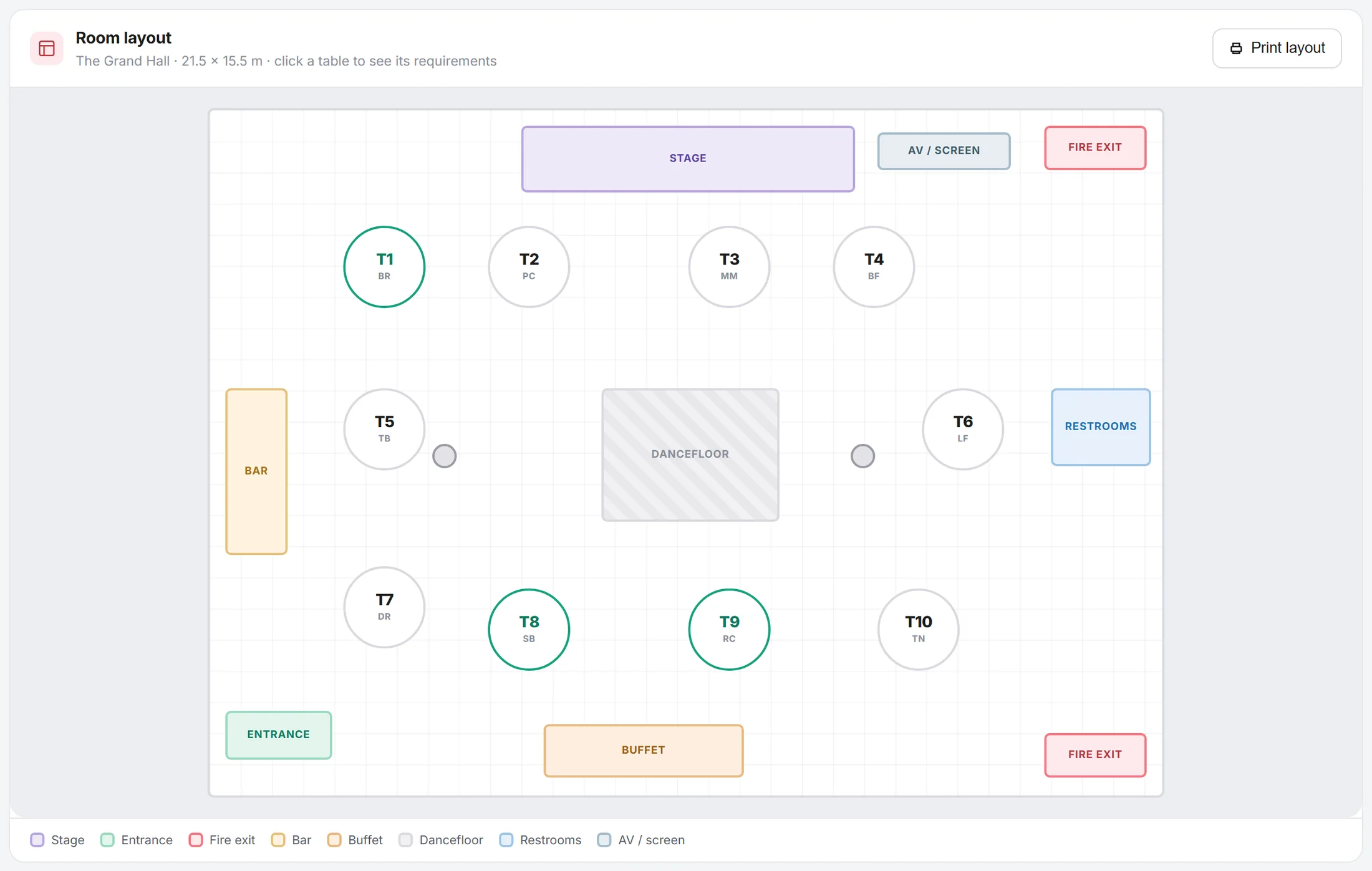
Sketch the room layout with our interactive planner: tables, toilets, dancefloor, bar and stage, all clearly laid out in the brief. It is the same plan the venue works from on the night.
Set up automated notifications for every event, with tracking links and QR codes generated for you to promote through social media and printed flyers.
Scan the QR code on the ticket in a browser on any phone and read the whole booking: upgrades, menu choices, allergies, table, seat number and special requests.
Refund a single line item from an itemised booking without unpicking the entire process, refund several tickets at once, and move a seat or cancel a guest without re-issuing everyone's tickets.
Set discounts on anything sold, cross-sold or upsold at an event, not just tickets. Cap the redemptions per code or per buyer and set a time limit, all enforced at checkout.
No need to sign up. Click any of the screen demos below to see how it all works.
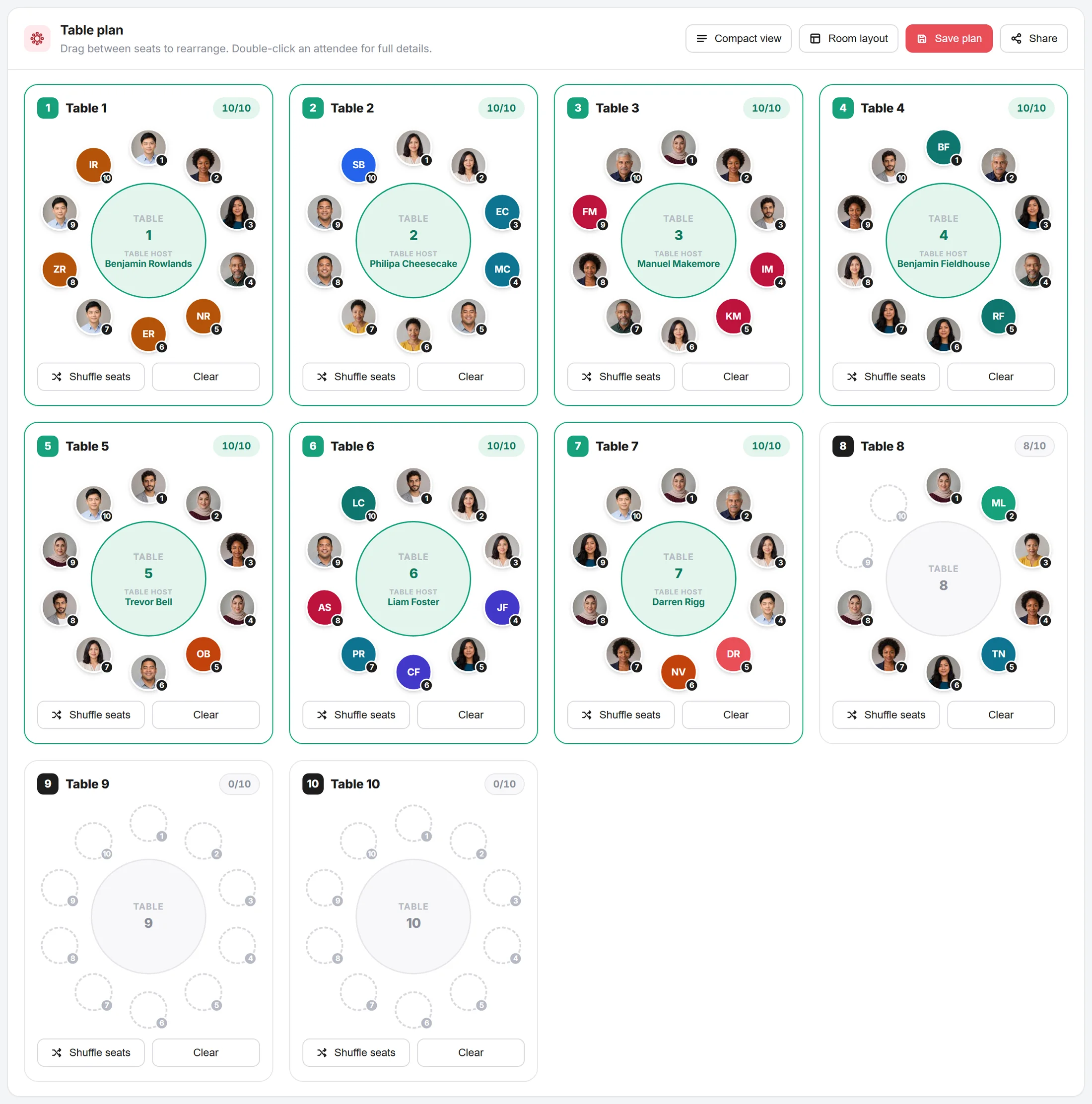
Set it to auto-allocate, or drag and drop guests onto their tables by hand. Hover over any guest to check their menu choices and special requests.
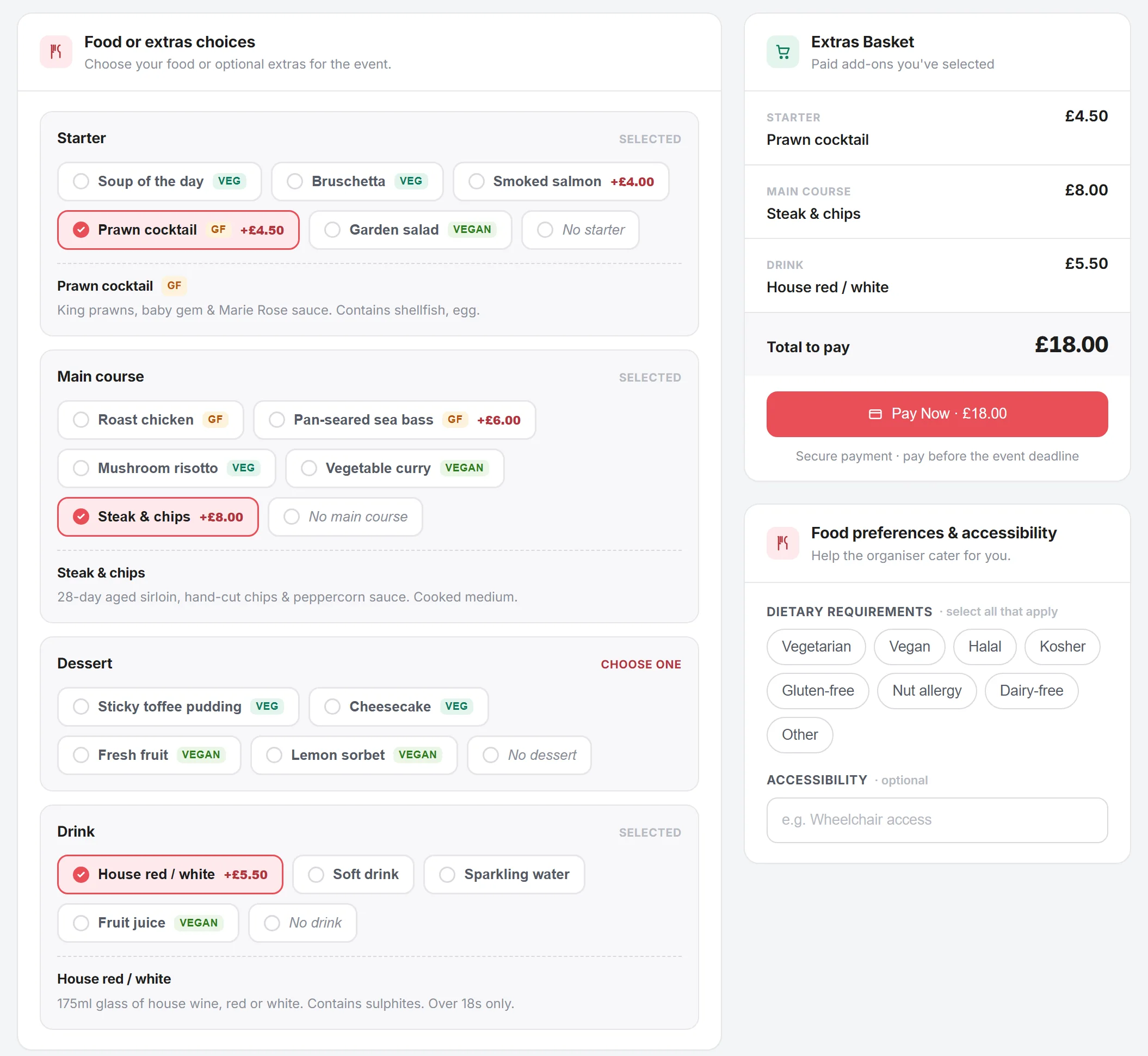
Every invited guest gets a link to confirm attendance, make their food choices and even buy their own extras: drinks, merchandise and upgrades. The booker never relays an order and you never chase one.
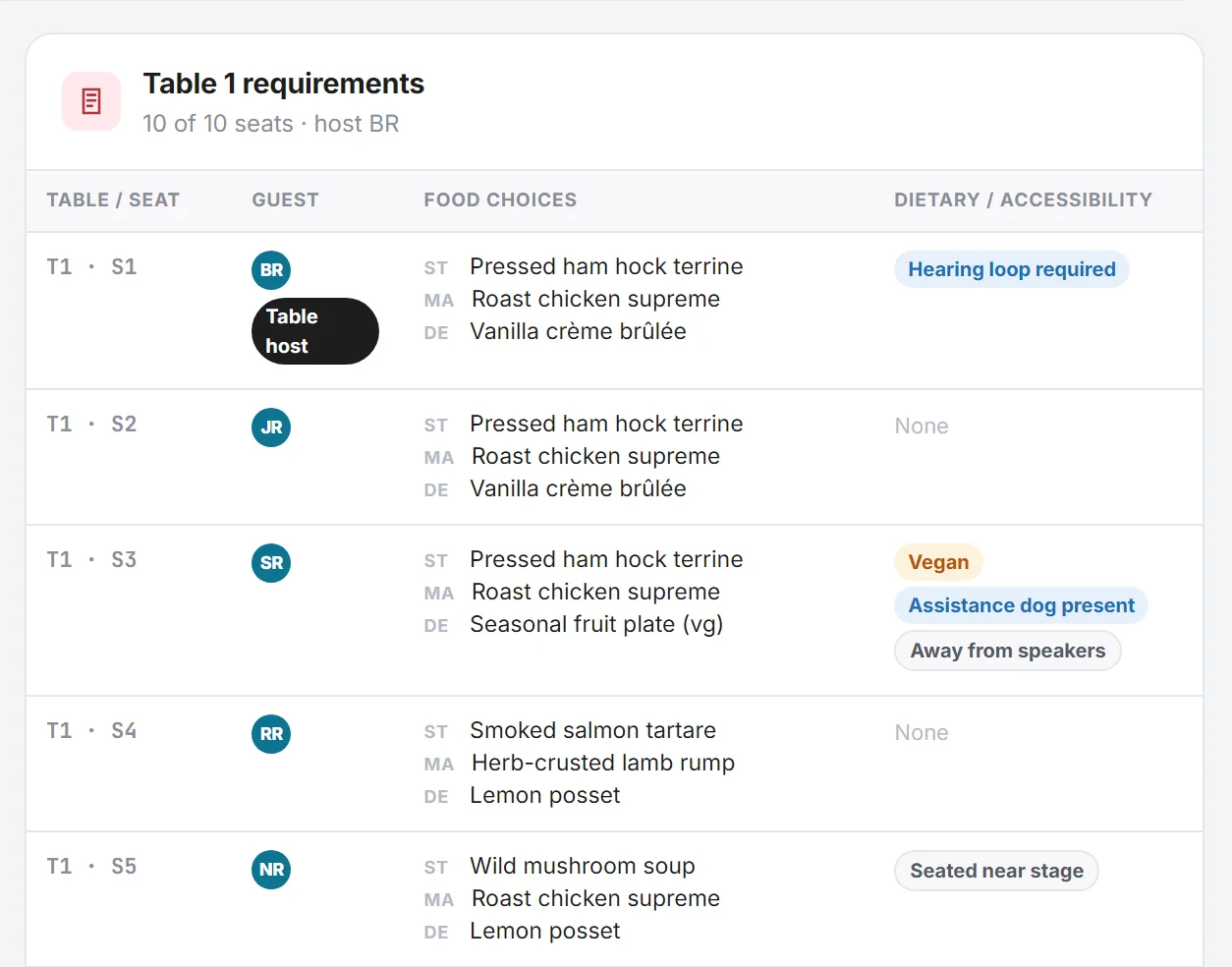
A real-time brief showing the key data: the number of covers, the specific food choices keyed to each seat number, and the room layout you specified. It updates as bookings change, and no guest's name or contact details travel with it.
We have simplified the booking process for everyone involved. A single-ticket networking event skips step two and goes straight to check-in.
The booker selects the ticket options, sets food and drink preferences, and can upgrade or pay for extras. All of it ends up in a structured, easy-to-follow plan for the venue, rather than free-text notes for someone to read out later.
The booker enters a name and an email address, and stops there. Each guest is allocated their own ticket automatically and gives their own preferences: courses, dietaries, accessibility needs and any extras they want to buy. Nobody has to chase anybody by email.
The ticket displays every one of the guest's choices, and includes their seat number. Your team on the door has a very simple job: check people in on a device they already own.
The numbers below come from the organisers who reported them, not from us.
less event admin
Lee Foster, Revitalise Networking
taken in the first two hours
Nathan Pacitto, NRP Coaching
saved per event on tables and dietaries
Sue Richards, KCC Networking
revenue at the same cost base
Sue Richards, KCC Networking
Net Hub has completely transformed my business. We've doubled revenue without increasing costs by automating every process, freeing up my time to focus on delivering value to members and growing KCC. The built-in cross-sell and upsell tools have significantly boosted profits.

Net Hub has completely transformed our event management. We've cut admin time by 80% and our attendees love the seamless experience.

I generated £2k in just two hours through the booking system. The tiered pricing tools are a game changer for event revenue.

No tiered plans: every feature is included. The tables, the dietaries, the guest portal, the room layout, the lot — all of it is on the £9 plan.
Events Only
£9 + VAT / month
Built for organisers who run events and nothing else. Tickets, tables, dietaries and the guest emails, all on the one subscription.
Start free trial5% transaction fee on ticket and item sales. No setup fee, and the money reaches you at point of sale.
What you get
Questions organisers ask first
Yes. Ticket tiers are tied to membership status, subscription tier or guest-of-member status. Events Builder checks the buyer against your member list at checkout, so a non-member cannot buy the member rate by getting hold of the link.
Set a tier at £0 and cap how many a member can claim, per event or across the series. The guest still gets a real ticket, so they still appear on the door list and can still be seated and fed.
You do, at the point of sale. We never hold customer funds and there are no back end rebates. Fees are shown in the dashboard before you publish, and you choose whether to add them on top or absorb them in the ticket price.
No. The booker invites them by name and email, and each guest gets their own ticket with a guest checkout for courses, dietaries and accessibility needs.
You set the table sizes and the rules: keep this booking together, split this group of fourteen across two tables, seat sponsors near the top table. Events Builder fills the room against those rules, and you drag anyone who still needs moving.
A room layout and a live table plan: covers per table, course counts, allergies and accessibility needs. It updates as bookings change, so the kitchen is not working from a spreadsheet you emailed a fortnight ago.
Yes. Add custom questions to any ticket type: handicap, playing position, kit size, date of birth, emergency contact, parental consent. Answers appear on the ticket and in your exports.
No. Check-in runs in the browser on a phone or tablet and scans the QR code on the ticket.